Request Information
ERP Software Solutions for Manufacturers and Distributors The TGI Difference Discover TGI and Enterprise 21 Enterprise 21 Product Demonstrations Customer Case Studies Software Selection

ERP Insights


ERP Selection: The Importance of a Quantitative ERP Software Selection Process

February 2nd, 2010 by Alex Smith

The ERP selection process is one of the most important activities in which an organization engages. Selecting an ERP system represents a technological and business process transformation for the organization; therefore, it is imperative that the organization conduct a thorough, quantitative analysis of various ERP software companies and solutions. In doing so, the business’s software selection team can gain a true “apples to apples” comparison of each software solution and determine which solution offers the best functional fit for the organization.

To help manufacturers and distributors in this process, TGI’s Software Selection Tool Kit offers, among other resources, software demonstration script templates and grading sheets to be used for onsite ERP software demonstrations. The selection team can use these templates to develop a software demonstration script that reflects the key software requirements of the organization. The selection team would then distribute these scripts to a select group (usually 2 or 3) of vendors with sample data (products, parts, ingredients, vendors, customers, etc.). The software vendors, in turn, would use the supplied sample data to follow the demonstration script prepared by the selection team. Using the software demonstration grading sheets contained in TGI’s Software Selection Tool Kit, the selection team can score how each vendor performed for each task in the demonstration script. Following the final onsite software demonstration, the selection team can compile scores for each ERP software vendor and see, quantitatively, how each software solution compared to the other demonstrated software solutions. The end result of this process will be a software vendor and solution that outscored and outperformed the other software solutions that were demonstrated.

By requiring software vendors to follow a demonstration script that reflects the organization’s key software requirements, the selection team will be able to see first hand how each vendor can meet those requirements. This process also prevents the software vendor from shying away from a specific software requirement that it knows it won’t be able to meet and ensures that each software vendor was evaluated in a consistent manner.

To download TGI’s onsite software demonstration templates and grading sheets, please click here.

Follow TGI on Twitter Follow TGI


ERP System Implementation Critical Success Factor: Proper Establishment and Execution of an Implementation Test Plan

January 26th, 2010 by Dave Litzenberg

The top three critical factors for a successful ERP implementation are the proper establishment and execution of a training plan, data migration plan, and a comprehensive implementation test plan.  From my experience, the proper establishment and execution of a comprehensive implementation test plan is perhaps the most overlooked of the three plans.

The test plan needs to be representative of how the company does business as a whole and should include the following:

  • Customer-facing (i.e., quote to cash, customer service, customer self-service);
  • Operational (i.e., demand to pay on the procurement side, inventory management and warehouse operations, manufacturing planning and execution); and
  • Compliance and control (i.e., financial management and reporting, lot traceability, quality management, industry compliance).

Let’s discuss how a company goes about establishing a comprehensive implementation test plan.  The starting point for the creation of a test plan can be to select some 50-100 customer orders out of the existing customer order files at random.  Experienced personnel can review these randomly-selected orders to make sure they collectively establish how the company does business as a whole.  Should there be some nuances that need to be added, specific customer orders meeting those scenarios can be pulled from the files as well and added to the list.

Assuming you did a good job of establishing a software demonstration script during the software evaluation process, the script can be another key input into the test plan creation process.  The test plan should consist of a series of test scenarios which may also be called “use cases.”  Associated with each test scenario would be some narrative about what is being tested, specific data that is to be used in the test, and the expected results of the test.

The test plan should also include some test cases to stress test the system to verify there are no issues with data tables that need to be re-indexed or infrastructure bottlenecks that need to be addressed (network capacity, memory requirements, processor speed, etc.).

The test plan should be executed by functional end user personnel – not just a couple of IT people running through the process by themselves.  There are two key benefits to this process.  First, the functional end users will be aware of nuances that may not have been addressed in the existing test cases.  These process anomalies need to be identified and added to the test plan.  Second, this process reinforces the training functional end users have received to date to verify whether or not additional training is necessary to ensure a smooth go live experience.

The test plan document should include space on each scenario to document the actual results of the test, the names of the individuals who performed the specific test case and the date it was performed, and any pertinent observations made during the test run.  Results should be documented in writing – or electronically – so the results can be shared with the implementation core team consisting of both customer and software vendor personnel and the customer’s executive sponsor.

The test plan should be a living document, which is updated as the business changes over time.
The test plan should be re-executed when a version upgrade is being implemented to validate there are no business processes that have become broken as a result of the upgrade process.

Additionally, a good rule of thumb for ERP software system enhancements is to establish the associated functional test plan or use case for that enhancement at the same time the enhancement is being defined.  This incremental portion of the test plan can be incorporated into the overall test plan.

By effectively establishing and executing of a comprehensive implementation test plan, companies implementing Enterprise 21 can expect their go live experiences to be as smooth as possible with the successful entry, picking, packing, shipping, and invoicing of customer orders day one.

Follow TGI on Twitter Follow TGI


Small Business ERP Total Cost of Ownership: Looking Beyond Upfront and First Year Costs

January 19th, 2010 by Alex Smith

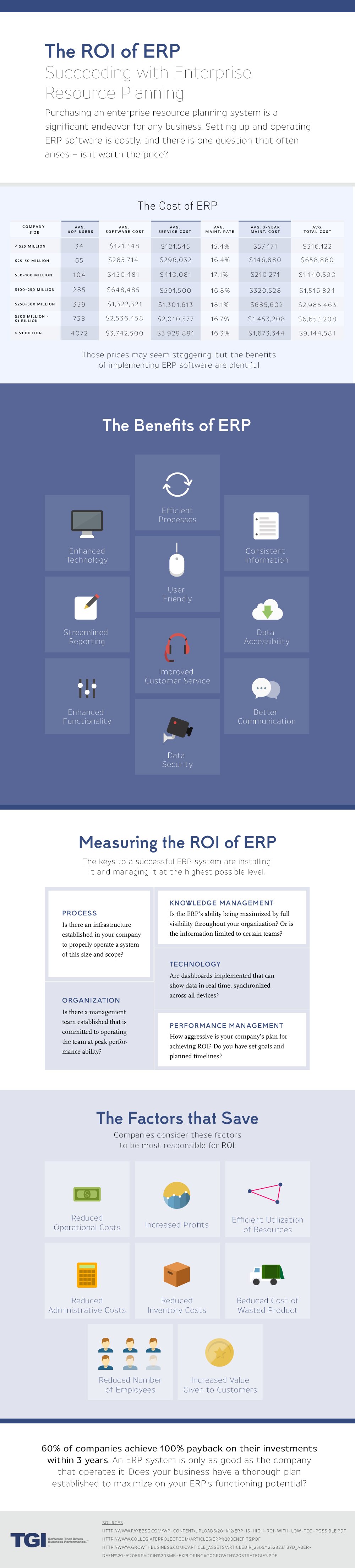
One of the most significant hurdles a small business faces in deciding whether or not to migrate to an ERP system is project cost. Generally speaking, the total cost of ERP implementation can be divided into three main categories, including software licensing fees, implementation and training fees, and annual maintenance fees. This third category, annual maintenance, is often overlooked in the software evaluation process. It is imperative that the small business’s selection team consider not only the software vendor’s maintenance fee during implementation but the software vendor’s maintenance fees for the years following implementation (and what is included with such maintenance fees) in order to calculate an estimated five-year total cost of ownership. This five-year total cost of ownership calculation will give the selection team a better view of what the business’s projected cash requirements will be for implementation as well as the years following implementation to determine the most cost-effective long term solution for the organization.

Many software vendors begin to charge their new customers annual maintenance fees the day contracts are signed. At TGI, we believe charging new customers maintenance fees during ERP implementation is inappropriate. Given that a small business ERP implementation may take anywhere between three and six months, we do not believe a business should have to pay maintenance fees on Enterprise 21 when the software is not yet being used in a live transaction environment – annual maintenance for Enterprise 21 is free for one year from the date of software installation, allowing for a more cost-effective first year of ERP ownership.

Secondly, the business’s selection team should consider each software vendor’s maintenance fees for each year following ERP implementation. Do the software vendor’s fees increase after the first year? Do the vendor’s maintenance fees increase each and every year over time? In addition, two great questions to ask ERP vendors are, “What is your annual maintenance fee today? What was your annual maintenance fee five years ago?” While these two questions may seem inconsequential at first, they are crucial to determining the most cost-effective long term ERP solution for the business. The business does not want to be faced with a situation in which its maintenance fees have doubled in the first three years following ERP implementation. When a given vendor’s new software sales start to slump in times of economic downturn, the easiest way for the vendor to make up for its loss in revenue is to increase its maintenance fees for its existing customers; therefore, it is crucial that the selection team search for an ERP vendor with a track record of consistent, non-escalating maintenance fees over time. At TGI, we are proud to say that we have never increased our annual maintenance fees since the company was founded in 1990.

By analyzing ERP vendors’ total long term solution cost, not just the cost to be incurred during the first year of ERP ownership, the small business will have a more accurate view of its budgetary requirements for the years following implementation and be in a position to determine the most cost-effective long term ERP software solution.

Follow TGI on Twitter Follow TGI


The ERP Selection Process: 50 Questions for Every ERP Software Supplier

January 13th, 2010 by Alex Smith

We recently added a new white paper to the TGI Resources Library, 50 Questions for Every ERP Software Supplier. This white paper lists 50 questions that are critical to a successful ERP selection project and must be asked of every potential ERP vendor. While there are some basic, general questions about product functionality, the white paper is not intended to be a list of questions relating exclusively to functional features; rather, the questions are designed to give the selection team a better feel for the software vendor’s general business philosophies, organizational longevity, approach to ERP implementation and customer support, annual maintenance fees, software upgrades, etc. One can think of the white paper as a “Getting to Know You” list of questions to ask ERP vendors. To download the 50 Questions for Every ERP Software Supplier white paper from the TGI Resources Library, please click here.

Follow TGI on Twitter Follow TGI


Process Manufacturing Software: Enabling Effective Product Shelf Life Management

January 12th, 2010 by Dave Litzenberg

Strong process manufacturing software solutions like Enterprise 21 can enable companies to establish an effective product shelf life management program.  Within the system, one can establish shelf life parameters by product group or category.  For example, certain classes of products may have a predetermined shelf life of 90 days from the date of manufacture while others may have a 120 day shelf life.  Specific lots of ingredients and/or finished goods will have expiration dates associated with those items based on how these parameters are established.

The Enterprise 21 ERP system enables the allocation of products on a first expire, first out (FEFO) methodology – both for the consumption of ingredients and intermediaries in manufacturing processes and for finished goods shipment to customers.  Additionally, one can manage retesting of products through the establishment of parameters relative to how near an item’s expiration date it is desired to retest a product’s remaining shelf life.

As products reach their retest periods, the system can place those items on quality hold automatically, and quality control personnel can be alerted as to the need to perform the retesting process to determine the remaining shelf lives for those items.  Based on those test results, one can establish new expiration dates for those items and release those items from quality hold back into active inventory.  Should there be excess inventory approaching expiration dates, the company’s sales organization can be alerted that it may need to run a product promotion or special to move those items from inventory prior to it reaching those expiration dates.

There may be instances in which certain customers may require a guaranteed minimum shelf life for the products they purchase.  In these cases, there are parameters that can be defined within Enterprise 21 noting a given customer’s requirements for guaranteed shelf life on a product-by-product basis.  Then, when one of these customers has product being allocated to its sales order line items, the FEFO methodology can be overridden to make sure the customer’s guaranteed shelf life requirements are being met.

The Enterprise 21 system will help enable process manufacturing companies to minimize their exposure to products needing to be thrown away or sold at a substantially reduced cost while concurrently meeting customer guaranteed shelf life requirements through the combination of first expire, first out product allocation, product retest procedures, and guaranteed customer shelf life management capabilities.

Follow TGI on Twitter Follow TGI


Leveraging Manufacturing Software Functionality for Distributors

January 5th, 2010 by Alex Smith

Virtually every one of the distributors with whom we work has some sort of kitting, assembly, and/or light manufacturing software functionality requirements. With Enterprise 21’s integrated manufacturing capabilities, distributors are able to meet both their manufacturing and material requirements planning requirements with a single ERP solution.

For distributors who sell kitted items, Enterprise 21 allows for a multi-level bill of materials to be defined for each kitted item. The system also allows for substituted items for any component on the BOM. In addition, distributors can associate both labor and burden costs to each bill of material, allowing the organization to gain better visibility to the true cost of each kitted item.

Furthermore, material planning for each item in a given kit can be accomplished through Enterprise 21’s integrated forecasting and planning functionality. This gives distributors the ability to plan appropriately for each product it sells whether the product is sold on an individual basis, in a kit, or both while simultaneously reducing inventory carrying costs and improving order and line item fill rates.

By taking advantage of Enterprise 21’s integrated manufacturing software functionality, distributors can meet their software requirements with a single ERP software solution without having to purchase additional manufacturing and planning modules as add-ons or bolt-ons from third-party software providers.

Follow TGI on Twitter Follow TGI


Buying a fully-integrated ERP software suite vs. a best-of-breed solution approach

December 25th, 2009 by Dave Litzenberg

This article will explore the relative advantages of acquiring and implementing a fully-integrated ERP software system rather than buying application software based on a best-of-breed solution approach.

A typical manufacturing or distribution enterprise will need the following types of functionality:

  • Financial management and reporting;
  • Inventory management, purchasing, and order management;
  • E-commerce;
  • Customer relationship management;
  • Manufacturing planning and execution;
  • Warehouse management;
  • Forecasting and planning; and
  • Decision support and business intelligence.

While one could buy subsets of the above list from separate vendors, here are some of the disadvantages to buying this functionality based on a best-of-breed approach:

  • Separate systems with separate infrastructure – separate database instances potentially requiring separate servers.
  • Different look and feel for various applications – users would have to learn different sets of commands and menu structures for different applications.
  • Sharing of data across separate systems – passing of data would generally be done via a batch process.
  • Timeliness of data across the enterprise – even if the data were shared perfectly across the separate systems, there would be time delays between the time data is initially present in one system and when it becomes visible in the other system.
  • Single version of the truth for the entire business – when data is not fully in-sync, there can be differences of opinion as to whose data is correct (i.e., what were the monthly sales figures for customers in a given category or geographical region?).
  • Everyone in the organization works from the same set of information – provides visibility to data from across the organization to make well-informed decisions that impact customers and the organization as a whole.
  • “Least common denominator” for functionality – often an overlooked point in discussion of this topic. There can be some enhanced functionality in one of the functional areas that is the reason the business decided to buy that specific best-of-breed solution in the first place; however, the functionality and data needed from other functional application areas to support and enable that functionality may not be present or easy to access in those other modules, making the new functionality impossible to use.

The following describes the spectrum of integration methods for enterprise-class application software:

  • Fully-integrated system – designed and built from the ground up as an integrated whole all by the same software development organization and team.
  • Separate systems that are owned by the same software vendor – software vendors may have acquired separate systems and developed integration points between these solutions.  In general there would be separate development teams for the various solutions within the given software development organization. The development teams’ primary focus would be on functionality and ease of use enhancements within their specific product lines, not the integration points between various solutions.  There could be a third, totally separate development team for an integration solution from the software vendor.
  • Systems from different organizations that work together – similar to systems that are owned by the same software vendor above, except in this case the separate development organizations focusing on the separate solutions are not owned by the same parent organization.  As you might imagine, this further complicates matters.  One solution provider may elect to change their complete database schema from one software release to another thus disabling any existing integration points. This approach also poses problems for the upgrade process, software vendor roles and responsibilities, and paying maintenance fees to multiple software vendors year after year.
  • One-off integrations by systems integrators – in this case, a systems integrator who is implementing one or more of the software solutions for a given customer may have developed an integration point between two solutions.  In this case, the systems integrator is the only one concerned with the integration – not the development organizations who own the separate software solutions.  This is the most precarious situation of all of the non-fully integrated solutions scenarios.

Core advantages of fully-integrated systems:

  • Data is timely and accurate across the entire enterprise with single points of data entry.
  • Training of personnel in one functional area can translate into other functional areas because the usability aspects of the system as well as core functions (creating new items, querying for data, etc.) will be the same across all areas of the application suite.
  • Single version of the truth – by having one centralized system, data will be the same for the entire enterprise.
  • Integration between functional areas will be the strongest and will be in the best position to enable a company to implement version upgrades as they become available without risking invalidating an integration point between two separate systems.
  • Should be able to take advantage of all functionality in the system without concern about running up against a “least common denominator” situation where functionality in one area of the system may be unusable because corresponding functionality and data may not exist in other functional areas of the business system.

It has been my experience over the years that most organizations who have adopted a best-of-breed approach have not done so based on a strategic decision; rather, they have had a core set of functionality they have decided is the starting point for ERP selection and implementation purposes of a new system.  Rather than focusing on a superset of functionality they will likely ultimately need over time, they may have made a decision to go with an ERP software package that fit the core subset of capabilities very nicely at a price point that was substantially lower than fully-integrated solutions with broader capabilities.

Over time, however, the business outgrows the functionality originally selected and implemented and is now forced to make a decision of whether it wants to keep its existing software and add a bolt-on solution to what it already has or start over and go with a broader, fully-integrated ERP solution.

Organizations are strongly encouraged to step back and ask themselves where they are going strategically and what complete set of functionality they will ultimately need over time so they can buy a fully-integrated software suite that provides this complete set of functionality even if they don’t take advantage of all of its capabilities day one.

Follow TGI on Twitter Follow TGI


ERP System Implementation Critical Success Factor: Proper Planning and Execution of a Data Migration Strategy

December 23rd, 2009 by Dave Litzenberg

One of the key elements of any enterprise software implementation is data migration.  Exactly what data is migrated to the new system in what level of detail is a key decision point to be considered during the implementation process.

To be able to make a well-informed decision about what data to migrate, manufacturing and distribution organizations would be well-advised to start with the target of where they want to be with their new system and work backwards.

Assuming there is any reasonable amount of legacy data, the decision to migrate existing data to the new ERP system rather than manually rekey the data becomes obvious.  Data can be categorized into five main buckets:

  • Core base data: including products, customers, prospects, vendors, and associated contacts;
  • Pricing data: customer pricing and vendor pricing;
  • Facilities, manufacturing, and product unit of measure conversion data: including bills of material, formulations, and routings; facilities layouts including zones, locations, and bins; and product-specific unit of measure conversion factors;
  • Historical data: sales history which can be used as an input to generate a forecast and for sales analysis purposes; and
  • Open transactions and beginning balances: including open sales orders, open purchase orders, open sales quotes, open returns, open customer invoices (accounts receivable), open vendor invoices (accounts payable), and general ledger balances by account; these items must tie to corresponding values in the legacy system (i.e., inventory stock status, general ledger trial balance, aged accounts receivable by customer, and aged accounts payable by vendor).

Once the data migration strategy is defined, the next step for the ERP implementation project team is to execute that strategy successfully.  Data migration tends to be an iterative process which can be run three to five times during software implementation.  After each test migration, the data must be analyzed thoroughly to make sure the resulting data in the new system is correct and matches up with proper expectations and comparable data in the legacy system.

For a new ERP system to function properly and provide accurate transactions and business information to be trusted for analysis purposes, the core data, which is the lifeblood of the new system, must be accurate.  The migration of data from legacy systems is a critical success factor for ERP software implementation.

Follow TGI on Twitter Follow TGI


Food Processing Software: Improving Salmonella Analysis Tracking and Reporting

December 21st, 2009 by Alex Smith

In 2009, the food and beverage industry saw peanuts, pistachios, and prepackaged refrigerated cookie dough recalled and pulled off the shelves at retail stores and warehouses across the country for one reason: salmonella contamination. Many food and beverage businesses were then forced to shut down their operations for good, as their food processing software solution did not give them the ability to record and track raw ingredient lot numbers from suppliers, when those lot numbers were consumed in manufacturing, finished good lot numbers, and the finished good lot numbers that were ultimately shipped to end customers. As a result, businesses were forced to recall EVERYTHING that could have potentially been produced with a contaminated ingredient, a bad situation if you make packaged nuts and trail mixes.

To gain improved salmonella analysis tracking and reporting, food processors and distributors can leverage Enterprise 21’s food ERP software and integrated lot traceability functionality in a number of ways. First, raw ingredients purchased from suppliers can be flagged to be placed on quality hold each time the ingredient arrives into inventory. When the ingredient arrives into inventory, the receiving department would record, either manually or with RF and barcode devices, the ingredient that was received, the quantity that was received, and the lot number(s) for the ingredient received. The ingredient would then be placed in a holding area awaiting quality inspection. It is important to note that the ingredient received would not yet be released into available inventory to be consumed in manufacturing. Following the receipt of the ingredient, a person in the quality control/assurance department would be automatically notified that the ingredient was awaiting his or her inspection. As quality control personnel inspected the product, they could enter inspection values directly into Enterprise 21. Assuming the product is determined to be acceptable, it would then be approved and released into available inventory. If the product does not meet inspection criteria, the product can be rejected, and the quality department can specify a reason code for why the product was rejected.

Secondly, manufactured items can automatically be placed on quality hold each time a given item is produced. Again, as items are produced, they can be placed in a holding area awaiting quality inspection and testing for salmonella. Enterprise 21 would automatically notify the quality control department that a given item has been produced and is awaiting inspection. Quality control personnel can then test the manufactured product, enter inspection data into Enterprise 21, and then approve or disapprove the product to be released into available inventory for customer purchases. Inspection data can also be used to generate a Certificate of Analysis (COA), and this COA can be set to accompany the finished good each time the product is shipped to a customer.

Aside from improving the organization’s quality control inspection process and attaining improved visibility to quality inspection data, food and beverage companies’ customers will be much more comfortable doing business with an organization that can clearly demonstrate that any product shipped to them has been rigorously tested for salmonella contamination prior to shipment. This improvement in customer service ensures that the food manufacturer or distributor is adequately prepared for a product recall should one arise and increases the likelihood of repeat customer purchases given the sophisticated quality control and reporting mechanisms the organization has in place.

Follow TGI on Twitter Follow TGI


Wholesale Distribution Operations: Getting Your Warehouse Operations under Control with Barcodes and Scanning

December 15th, 2009 by Dave Litzenberg

Many of the wholesale distributors we meet who are engaging in a wholesale distribution software selection process have a common set of issues.  In general, they are printing pick tickets on paper, handing the print ticket to the next available picker, and telling the picker to go forth and pick.  In doing so, the picker takes the paper pick ticket around the warehouse and writes on the paper to show what has or has not been picked.  Some time later, after the picking process is done – most likely a shift or full day later after the picking has been completed – the paper pick ticket with the picker’s hand-written notes ends up in the possession of an administrator who enters the pick data into the distributor’s existing computer system.

Since there most likely is a substantial time delay between the picking and manual data entry processes, coupled with the fact that the picker’s chicken-scratched notes may be highly illegible, there will likely be errors introduced into the inventory data.  In cases in which the administrator can’t understand what the picker was attempting to convey, the administrator may have a discussion with that picker about their notes.  Again, depending on the time delay between the picking and writing on the pick ticket through this conversation with the administrator attempting to enter the data, inventory accuracy issues can get introduced due to time delays and the possibility that the picker may not even remember what their notes meant.

Even if the manual pick, writing on paper, and manual data entry processes were 100% accurate, they would nonetheless be untimely and inefficient, as there would always be some delay between the time picking was completed and the time data was entered into the system.

Alternatively, for companies using strong wholesale distribution software systems that come with fully-integrated warehouse management functionality like Enterprise 21, when barcodes and scanning are introduced into the process, the system would know the disposition of the picking process immediately at the time a picker was performing those operations.  Furthermore, since the scanning process can also confirm that the item that was intended to be picked was in fact picked correctly, inventory accuracy and customer shipment accuracy will increase.  This should lead to a reduction in the number of customer returns due to mis-shipment of items on an order and an increase in customer satisfaction.

Without accurate and timely inventory data, the ability to leverage that information to have the correct product mix while reducing the wholesale distributor’s overall inventory position are an impossibility.  Companies using Enterprise 21 can achieve these benefits through the introduction of barcodes and scanning throughout the warehouse including the picking process without having to acquire any additional application software.

Follow TGI on Twitter Follow TGI